
Email Open Tracking: What 436 Local Business Inboxes Reveal
Email open tracking reads one pixel differently on Gmail, Microsoft 365 and security gateways. We checked the mail servers of 436 local businesses by industry.
Posted by
EElkeRelated reading
How to Get Photography Clients That Rebook Monthly
How to get photography clients who rebook instead of one-off gigs. Find restaurants, agents, and retailers on Google Maps and turn them into recurring accounts.
How to Get Painting Leads: $0.10 vs $85 Each
How to get painting leads at $0.10 each vs $85 on Angi. Build property manager, GC, and realtor partnerships with Google Maps instead of buying shared leads.
How to Get Moving Leads: $0.10 vs $75 Each
How to get moving leads at $0.10 each vs $75 from lead providers. Build property manager, realtor, and storage partnerships with Google Maps data.
Email open tracking rests on one tiny image. When it loads, your tool logs an open. What nobody tells you is that the same pixel behaves differently depending on who hosts the recipient's inbox — and if you sell to local businesses, you can actually find that out before you hit send.
So we did. We took the 436 businesses in our research data that publish an email address, looked up the mail server behind every one of them, and grouped them by provider and industry. The result explains why email open tracking looks reliable for some lists and like noise for others: a plumber's Gmail inbox and a law firm's Microsoft 365 tenant are not measuring the same thing.
This is not another open-rate benchmark. It is a map of where local-business mail actually lives, what each provider does to a tracking pixel, and how to test your own email open tracking in fifteen minutes before you trust a dashboard.
Key Findings: Email Open Tracking Across 436 Local Businesses
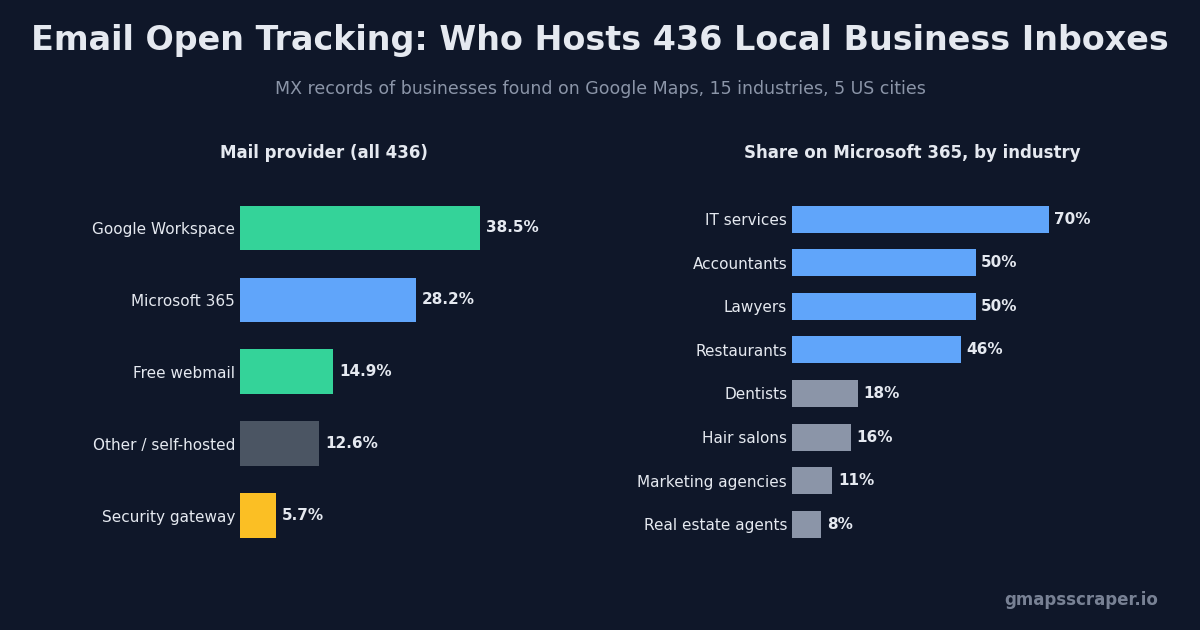
- 51.1% read mail through Google — 38.5% on Google Workspace and 12.6% on a personal Gmail address. For them, email open tracking sees a real first view but no location, no device and few repeat opens.
- 28.2% are on Microsoft 365, and another 5.7% sit behind a security gateway such as Proofpoint, Mimecast or Barracuda. Here opens tend to be undercounted, and early clicks can come from scanners.
- Industry decides the mix. 70% of IT service firms and half of accountants and lawyers run Microsoft 365. 80% of marketing agencies run Google Workspace. 43% of hair salons and 41% of plumbers use a free webmail address — usually the owner's own.
- The MX record cannot see Apple Mail. Mail Privacy Protection works on the reader's device, so any provider can produce opens that never happened.
- Segment before you interpret. A 60% open rate on a salon list and a 25% open rate on a law-firm list may describe identical behaviour.
How We Checked Which Mail Server Each Business Uses
The sample comes from the same research run behind our Google Maps business data report: one Google Maps search for each of 15 industries in New York, Los Angeles, Chicago, Houston and Miami, 1,174 businesses in total. We crawled each business website for contact emails; 436 published at least one.
One domain per business, one MX lookup per domain
For each business we kept a single email domain — its own domain where it had one, the webmail domain otherwise — and asked DNS for that domain's MX record, the entry that tells the internet which server accepts its mail. An MX pointing at aspmx.l.google.com means Google Workspace; one ending in mail.protection.outlook.com means Microsoft 365; pphosted.com means Proofpoint, and so on.
What an MX record can and cannot tell email open tracking
The MX record tells you who receives and filters the mail. It does not tell you which app the person reads it in: a Google Workspace user can read in Apple Mail, and a Microsoft 365 user can read on an iPhone. Treat the provider as the strongest single clue about how email open tracking will behave, not as a certainty. The sample is also modest — 22 to 58 businesses per industry — so read the large gaps and ignore small ones.
WHO HOSTS THE INBOX? 436 LOCAL BUSINESSES, BY MAIL SERVER
51.1%
read mail through Google — opens arrive via the Gmail image proxy
33.9%
sit on Microsoft 365 or behind a security gateway
Email open tracking reads the same pixel differently on each of these. Source: GMapsScraper research data, MX lookups October 2026.
Google Workspace and Gmail: Email Open Tracking Behind the Proxy
Just over half the list reads mail through Google, and Google is the friendliest provider for email open tracking — with a catch. Since 2013 Gmail has displayed images by default and fetched them through its own image proxy rather than from the reader's device. When someone opens your message, Google's servers request your pixel and show the cached copy to the reader.
What you still get
Because the proxy fetches on view, a first event from a Google address is usually a genuine open. Timing is meaningful: an event at 7:52 the morning after you sent is probably someone at a desk, which is useful context for a follow-up call.
What the proxy hides
Every request comes from Google's network, so the location and device in your tracker describe Google, not the reader. Repeat opens often never reach your server because Gmail serves its cached copy. If your email open tracking reports “opened once, from Mountain View” for a dentist in Miami, nothing is broken — that is the proxy.
Free Gmail: the owner's inbox
The 12.6% on personal Gmail deserve their own note. In our data they cluster in owner-operated trades — salons, plumbers, small restaurants — and a personal address on a business website is usually the owner's own. Email open tracking on these is about as clean as it gets: one reader, a phone that loads images, and a person who decides.
Microsoft 365 and Outlook: Where Email Open Tracking Undercounts
Microsoft 365 hosts 28.2% of the list, and it pulls email open tracking in the opposite direction. Classic Outlook for Windows does not download pictures from the internet automatically for senders outside the reader's safe list — Microsoft documents this as the default in its picture download support article. A cold email from you is, by definition, from outside that list.
Silent reads
The reader sees your text, not your pixel. Unless they click “download pictures” or add you as a trusted sender, the message can be read, forwarded and answered without your email open tracking ever registering an event. This is why Microsoft-heavy lists — accountants, law firms, IT providers — routinely show low open rates alongside perfectly normal reply rates.
Safe Links and early clicks
Organisations on Microsoft Defender for Office 365 can turn on Safe Links, which checks URLs in a message, including when a user clicks. Depending on the setup, link checks can reach your tracked links before a human does. A “click” seconds after delivery from a Microsoft address deserves suspicion, not a celebratory follow-up.
New Outlook and Outlook on the web
Newer Outlook clients and Outlook on the web handle external images differently from classic Outlook, and each organisation can change the defaults. That uncertainty is the practical point: on a Microsoft-heavy list you cannot assume what email open tracking sees, so you have to test it.
Security Gateways: Email Open Tracking Through a Filter
Twenty-five businesses — 5.7% — route mail through a dedicated filtering service before it reaches any inbox: 17 on Proofpoint, 5 on Mimecast, 3 on Barracuda. Several of these sit in front of Microsoft 365, so the mailbox behind them behaves like Outlook as well.
Gateways exist to inspect mail, and inspection can include requesting the URLs a message contains. For email open tracking that produces a recognisable pattern: a burst of events within a minute or two of delivery, from the gateway's network rather than the recipient's, often before anyone could plausibly have read the message. Those events say the message was delivered and scanned. They say nothing about a person.
Gateway customers skew toward firms that handle sensitive information — among industries with enough data, hotels and insurance agents had the highest gateway share at 12–14%. If your list is full of them, discount instant opens and judge the campaign on replies.
Self-Hosted and Regional Hosts: The Rawest Email Open Tracking Signal
The remaining 12.6% — 55 businesses — run mail somewhere other than Google, Microsoft or a gateway. Most are small: a mail. server on the business's own domain from its web host, Rackspace, Zoho, IONOS or a regional ISP. Contractors (30%) and dentists (24%) have the highest share of these; a contractor's website and mailbox frequently come from the same hosting plan.
These inboxes have no proxy in front of them, so the image request comes from whatever app the reader uses — a desktop client, a phone, a webmail page from the host. That makes them the closest thing to the textbook version of email open tracking: the location and device in your tracker may actually be the reader's. It also makes them the least predictable, because every host and client combination has its own image settings.
The practical reading is simple: trust timing here more than anywhere else, but do not read anything into a missing open. A self-hosted mailbox on a desktop client that blocks images will stay silent exactly like Outlook does.
Email Open Tracking by Industry
Grouped by industry, the provider mix splits local businesses into three rough camps, and each camp needs its own reading of email open tracking.
Microsoft-first: IT, accounting, legal, restaurants
IT service firms are the extreme at 70% Microsoft 365, followed by accountants and lawyers at 50% and restaurants at 46%. These lists will under-report opens. A low open rate here is not a deliverability alarm on its own; check replies and bounces before rewriting anything.
Google-first: agencies, real estate, contractors, vets
Marketing agencies are 80% Google Workspace, real estate agents 54%, veterinarians 48%, contractors 44%. Opens on these lists are mostly real first views. They are the lists where open data is most worth acting on — a quick call after a morning open is reasonable here and guesswork elsewhere.
Owner inboxes: salons and plumbers
Hair salons (43%) and plumbers (41%) lean on free webmail. Here email open tracking is close to a direct line to the decision-maker, which is also why it is worth being restrained: an owner who sees five follow-ups timed to the minute after each open will notice.
EMAIL OPEN TRACKING BY INDUSTRY — WHERE EACH INDUSTRY'S MAIL LIVES
| Industry | n | Google Workspace | Free webmail | Microsoft 365 | Gateway | Other |
|---|---|---|---|---|---|---|
| IT services | 23 | 17% | 0% | 70% | 9% | 4% |
| Accountants | 24 | 33% | 0% | 50% | 8% | 8% |
| Lawyers | 22 | 27% | 14% | 50% | 0% | 9% |
| Restaurants | 35 | 29% | 14% | 46% | 6% | 6% |
| Insurance agents | 24 | 25% | 8% | 42% | 12% | 12% |
| Gyms | 36 | 39% | 8% | 39% | 6% | 8% |
| Veterinarians | 31 | 48% | 10% | 29% | 0% | 13% |
| Hotels | 28 | 36% | 7% | 29% | 14% | 14% |
| Dentists | 38 | 42% | 13% | 18% | 3% | 24% |
| Hair salons | 58 | 28% | 43% | 16% | 2% | 12% |
| Marketing agencies | 35 | 80% | 0% | 11% | 3% | 6% |
| Contractors | 27 | 44% | 7% | 11% | 7% | 30% |
| Plumbers | 22 | 32% | 41% | 9% | 5% | 14% |
| Real estate agents | 26 | 54% | 15% | 8% | 8% | 15% |
Sorted by Microsoft 365 share. Car dealerships (7 businesses) omitted as too small. Each industry is 22–58 businesses — read the gaps, not the decimals.
Email Open Tracking by City: Houston and Miami Lean Microsoft
Location matters less than industry, but it is not nothing. Split by city, the same fifteen industries produce noticeably different provider mixes:
| City | Businesses | Google Workspace | Microsoft 365 | Free webmail | Gateway |
|---|---|---|---|---|---|
| New York | 115 | 46% | 21% | 16% | 7% |
| Chicago | 99 | 44% | 27% | 10% | 3% |
| Los Angeles | 67 | 37% | 30% | 18% | 3% |
| Miami | 83 | 33% | 34% | 13% | 7% |
| Houston | 72 | 26% | 33% | 19% | 8% |
Houston and Miami are the only two cities where Microsoft 365 outnumbers Google Workspace, and Houston also has the highest gateway share. New York is the most Google-heavy at 46% against 21% Microsoft. If you run the same campaign in New York and Houston, expect email open tracking to report fewer opens in Houston even when interest is identical — and resist the urge to conclude that Houston is the worse market.
Each city sample mixes all fifteen industries, so part of the gap reflects which businesses happened to publish an email in each place. The direction is consistent enough to plan around; the exact percentages are not.
What Email Open Tracking Can't See: Apple Mail
One large distortion is invisible to any MX lookup. Mail Privacy Protection in Apple Mail loads remote content privately in the background, whether or not the message is opened, and hides the reader's IP address. It is a setting on the reader's device, so it applies equally to a Gmail, Workspace or Microsoft 365 address read in Apple Mail.
For email open tracking this means a share of “opens” from every provider are preloads. You cannot remove them by segmenting on provider; you can only stop treating a single open as intent. Two opens hours apart, or an open followed by a reply, are worth more than any first event.
WHAT ONE PIXEL REQUEST MEANS, PROVIDER BY PROVIDER
| Recipient setup | What happens to images | A pixel event usually means | Email open tracking can't see |
|---|---|---|---|
| Google Workspace / Gmail | Images load by default, fetched through Google's proxy when the message is viewed | Usually a real first view | Location, device and repeat opens (served from Google's cache) |
| Microsoft 365 (classic Outlook) | External pictures blocked by default until the reader downloads them or trusts you | Often no event at all, even after a read | Silent reads — opens undercount |
| Microsoft 365 with Defender / Safe Links | Links can be checked by Microsoft before and at click time | Clicks within seconds of delivery may be a scanner | Whether the first click was a person |
| Proofpoint, Mimecast, Barracuda | Mail passes a filtering gateway that may request URLs in the message | Instant events cluster from the gateway's network | Which events are human |
| Any provider read in Apple Mail with Privacy Protection | Remote content preloaded in the background, opened or not | An event even if never opened | Everything — invisible from the MX record |
Defaults described per Google, Microsoft and Apple documentation; organisations can change them, which is exactly why you test.
How to Test Email Open Tracking Before You Trust It
Documentation tells you the defaults; only a test tells you what your email open tracking reports for the providers on your list. It takes about fifteen minutes and a couple of inboxes you control.
1. Create a separate pixel for each test inbox
You want one pixel per destination so every event in the log is unambiguous. We use MailPixel for this kind of check because it creates a hosted pixel without an account and lists each image request with a server timestamp on a private activity page, kept for 30 days. It also states plainly that a request is a signal, not proof of a read — the right frame for this exercise.
2. Put the pixel in a real message
The pixel has to arrive as an image, not as pasted text. MailPixel's guide on how to use a tracking pixel covers both routes — the full HTML snippet for a sending tool or template, and the bare pixel URL for editors with an image-URL field. Send from the same tool and domain you use for outreach, so the test sees what prospects see.
3. Wait, then open, then open again
Leave each message unopened for ten minutes and check the activity page. Any event in that window came from a scanner or a prefetch. Then open the message, wait, and open it again. Going by the documented defaults, expect the Google address to record its first view and stay quiet on the second, and a classic Outlook mailbox to record nothing until you download the pictures. If your results differ, your results win.
4. Keep the pattern as your reading key
Write down what each provider produced. That small table is how you interpret email open tracking on real prospects with the same setup — far more useful than any industry benchmark.
TEST EMAIL OPEN TRACKING BEFORE YOU TRUST IT — 15 MINUTES
1
Create one hosted pixel per test
One pixel per recipient inbox, so the activity log is unambiguous.
2
Send to inboxes you control
A Gmail or Workspace address and an Outlook / Microsoft 365 address at minimum.
3
Wait before opening
Any event in the first minutes, before you open anything, is a scanner or prefetch.
4
Open, then open again
Note which open creates an event and which repeat opens never arrive.
5
Write down the pattern
That pattern is how to read real prospects on the same provider.
How to Check a Prospect's Mail Provider in Bulk
You do not need a paid tool to segment a list by provider. Export your leads, pull the domain out of each email address into a text file, and run one loop:
while read d; do
  printf "%s\t%s\n" "$d" "$(dig +short MX "$d" | sort -n | head -1)"
done < domains.txt > mx.tsv
Paste the result next to your lead sheet and label each row: anything containing google is Google, outlook.com is Microsoft 365, pphosted, mimecast or barracuda is a gateway. Now you can report email open tracking per segment instead of one blended number. If you build lists with our Google Maps email extractor, the domain is already in its own column; running the email verifier first keeps dead domains out of the lookup.
How to Read Email Open Tracking Data Once It's Segmented
With providers labelled, the same dashboard numbers start to mean something. These are the reading rules we use for local-business outreach:
| What you see | On Google / Gmail | On Microsoft 365 or a gateway |
|---|---|---|
| One open, hours after sending | Likely a real read — reasonable moment for a follow-up | A real read that also downloaded images — a strong signal here |
| Open within two minutes of delivery | Possible, if they were in their inbox | Probably a scanner — ignore |
| No open after three days | More likely unread or filtered | Tells you almost nothing |
| Several opens in a short burst | Unusual — Gmail caches; check for forwarding | Scanner or several systems checking the same message |
| Reply without any recorded open | Rare | Normal — images were never loaded |
The last row is the most useful check on your own data. Count replies that arrived with no open recorded, split by provider. On Microsoft-heavy segments that share is usually large, and it is the clearest evidence that low email open tracking numbers there are a measurement gap rather than a lack of interest.
Choosing an Email Open Tracking Tool for Outreach
The provider data changes what to look for in a tool. Volume and price matter less than whether it shows raw events with timestamps, lets you separate tests from real sends, and is honest about what an open means.
- Sending occasional one-to-one emails from Gmail? A lightweight Gmail tracker is enough; MailPixel's comparison of Gmail email trackers lays out the free-tier limits and signature trade-offs side by side.
- Already on Mailtrack and annoyed by the signature? Its overview of Mailtrack alternatives sorts them by why you want to switch rather than by feature count.
- Running sequences to hundreds of local businesses? Use your sending platform's tracking, but report it per provider segment and never trigger a follow-up on an open alone.
Frequently Asked Questions
Is email open tracking accurate?
It is accurate about image requests and approximate about people. A request from a Google address is usually a real first view; silence from a Microsoft 365 address often is not a missed read; any address read in Apple Mail can produce opens that never happened.
Why does my email open tracking show Mountain View, California?
Because the recipient uses Gmail or Google Workspace. The request came from Google's image proxy, so the location is Google's, not the reader's.
Does Outlook block email open tracking?
Classic Outlook blocks external pictures by default for senders the reader has not trusted, so the pixel often does not load. The email can still be read and answered — it simply does not register as an open.
Can I see which email provider a business uses?
Yes. Look up the MX record of its email domain with dig MX example.com or any MX lookup site. Google, Microsoft and the major gateways are easy to recognise from the hostname.
Should I turn off email open tracking for cold email?
For Microsoft-heavy or gateway-heavy lists it adds little and costs a remote image in every message. For Google-heavy and owner-inbox lists it is useful context. Either way, base follow-ups on replies and time, not on opens.
The Bottom Line
Half of local businesses read their mail through Google, a third through Microsoft or a filter, and the split depends heavily on the industry you sell to. Email open tracking is not broken; it is measuring a different thing on each of those inboxes. Look up the providers on your list, run a fifteen-minute test with a hosted pixel, and read each segment on its own terms.
If you are building the list itself, GMapsScraper pulls local businesses from Google Maps with phone, website and published emails in one export — and our cold email workflow for Google Maps leads picks up from there.